White Keys
Play full chords with one finger.
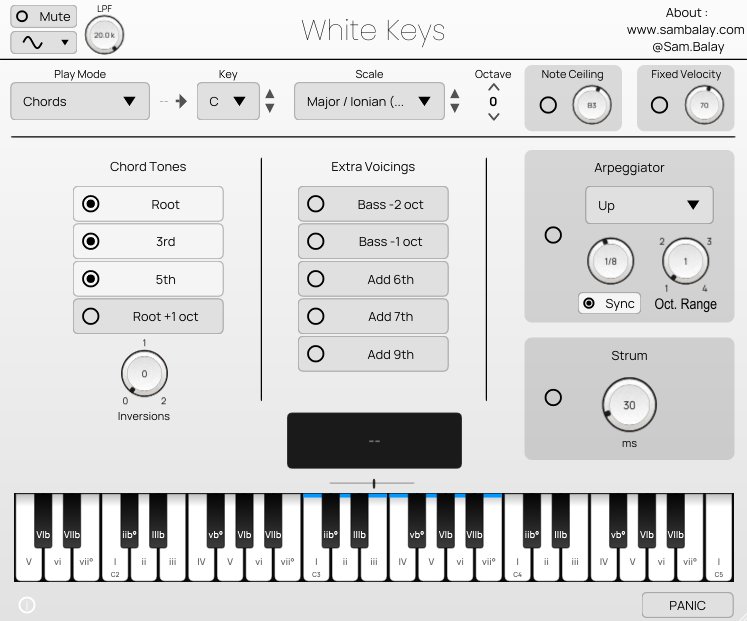
White Keys is a MIDI chord and scale plugin made for artists and producers who want to simplify how chords, scales and modes work while keeping their unique human feel and creative choices.
Pick a key and a scale, press one key, get the right chord. You can then strum it or arpeggiate it, and send it in real time to other instruments in you DAW.
Why you’ll love it
- Always in key. Every key plays a chord that fits your chosen key and scale. Nine scales and modes: major, minor, dorian, mixolydian, lydian, phrygian, locrian, harmonic minor and melodic minor.
- Shape chords as you play. Hold a key to switch between major, minor, sus2, sus4 and diminished, flip the inversion, or add a 6th, a 7th, a 9th or a deep bass note.
- Instant movement. Strum with an adjustable speed, or start the arpeggiator: up, down, up-down, down-up or random, over 1 to 4 octaves, synced to your tempo.
- Plays by itself, or drives your gear. Use the built-in synth, or mute it and send the notes as MIDI to other instruments in your DAW.
Three ways to play
- Single Notes : Makes all the white keys of your midi keyboard in scale.
- Chords : All the white keys of your midi keyboard plays a full chord that adapts to your scale.
- Chords + Momentary Modifiers : One finger plays a full chord (always in key) while one other finger modifies it : chord type, inversions and extensions, active as long as you hold the key.
Compatibility
White Keys is a VST3 instrument.
- Format: VST3 only (no AU, AAX or VST2 version).
- Systems: Windows 64-bit, macOS, Linux 64-bit.
Works in DAWs that load VST3 plugins, for example Reaper, Cubase, FL Studio, Studio One, Ableton Live (10.1 and later), Bitwig Studio and Ardour (Linux).
If in doubt, check your DAW’s manual for “VST3”. Compatibility depends on your DAW and its version.
As White Keys is VST3, it’s sadly not yet compatible with : Logic Pro (Audio Units only), GarageBand (Audio Units only), MainStage (Audio Units only), Pro Tools (AAX only), Ableton Live before 10.1, any DAW or version without VST3 support.
Open source (GPL)
White Keys is released under the GNU General Public License, version 3 or (at your option) any later version. The complete source code is included in your download. Built with HISE and JUCE.
© 2026 Sam Balay. The name “White Keys” and its logo are not covered by the GPL.
VST® is a registered trademark of Steinberg Media Technologies GmbH. All other trademarks are the property of their respective owners.
Terms of sale
- Provided as is, without warranty. White Keys is provided “as is”, without warranty of any kind.
- No after-sales service. No support, updates or bug fixes are included or promised. The installation guides cover the common problems.
- No refunds. White Keys is a digital product delivered immediately. By buying it, you expressly agree to immediate delivery and acknowledge that you lose your right of withdrawal. Please check the compatibility list before you buy.
FAQ
Does it work in Logic Pro, GarageBand or Pro Tools? No. Logic Pro and GarageBand only load Audio Units, and Pro Tools only loads AAX. White Keys is VST3 only.
How do I know if my DAW works with it? If your DAW can load VST3 plugins on your system, it should. Look for “VST3” in your DAW’s manual or plugin settings.
Does it make sound on its own? Yes. It has a built-in synth. Use the Mute button if you only want the MIDI output.
Can it play my other synths? Yes, through its MIDI output (channel 1), if your DAW lets an instrument plugin send MIDI to other tracks. How to route it depends on your DAW.
Do I need a MIDI keyboard? No. You can play on the on-screen keyboard with the mouse. A MIDI keyboard is more fun.
Windows or macOS shows a warning. Is that normal? Yes. The plugin is not code-signed, so your system may warn you about a downloaded file. The installation guide shows what to do, and the full source code is included for anyone who wants to inspect it.
Can I use it in commercial music? Yes. The music you make with White Keys is completely yours.
Is there support? Can I get a refund? No. White Keys is sold as is, with no after-sales service and no refunds. See the terms of sale above.